

免费 AVIF 转换器
这款免费 AVIF 转换器可将 JPG、PNG、WebP 和 HEIC 图片转为 AVIF 文件,也能把 AVIF 转回 JPG 或 PNG。支持批量转换,无需注册,你的图片保留在你的设备上。
将图片拖放到此处
支持 JPG、PNG、WebP、GIF、SVG 等
最大文件大小:100 MB · 支持多个文件
如何转换为 AVIF 或从 AVIF 转换
添加图片。
把 JPG、PNG、WebP、HEIC 或 AVIF 文件拖到上方区域,或点击“选择图片”。每个文件最大 100 MB。
选择输出格式。
每个文件默认已设为 AVIF。如需把 AVIF 文件转成其他格式,请选择 JPG、PNG 或 WebP,然后点击“应用到所有文件”。
转换并下载。
点击“全部转换”,然后用各文件自己的按钮保存,或点击“全部下载”获取一个 ZIP。保存 AVIF 可能比保存 JPG 更耗时。
关于 AVIF 格式
一种基于 AV1 视频编解码器的新一代图像格式,压缩率和画质均优于 JPEG、PNG,甚至 WebP。
优点
- 同类最佳的压缩效率
- 同时支持有损和无损压缩
- 支持 HDR 和广色域
- 免版税的开放标准
缺点
- 编码速度慢
- 旧版浏览器支持有限
- 尚未被图像编辑器广泛采用
- 渐进式解码支持仍在完善中
技术规格
最佳使用场景
为什么选择我们的免费 AVIF 转换器?
把图片制作成 AVIF 文件,或将 AVIF 转为 JPG、PNG 和 WebP,单个文件或整批处理均可,无水印,无需账号。
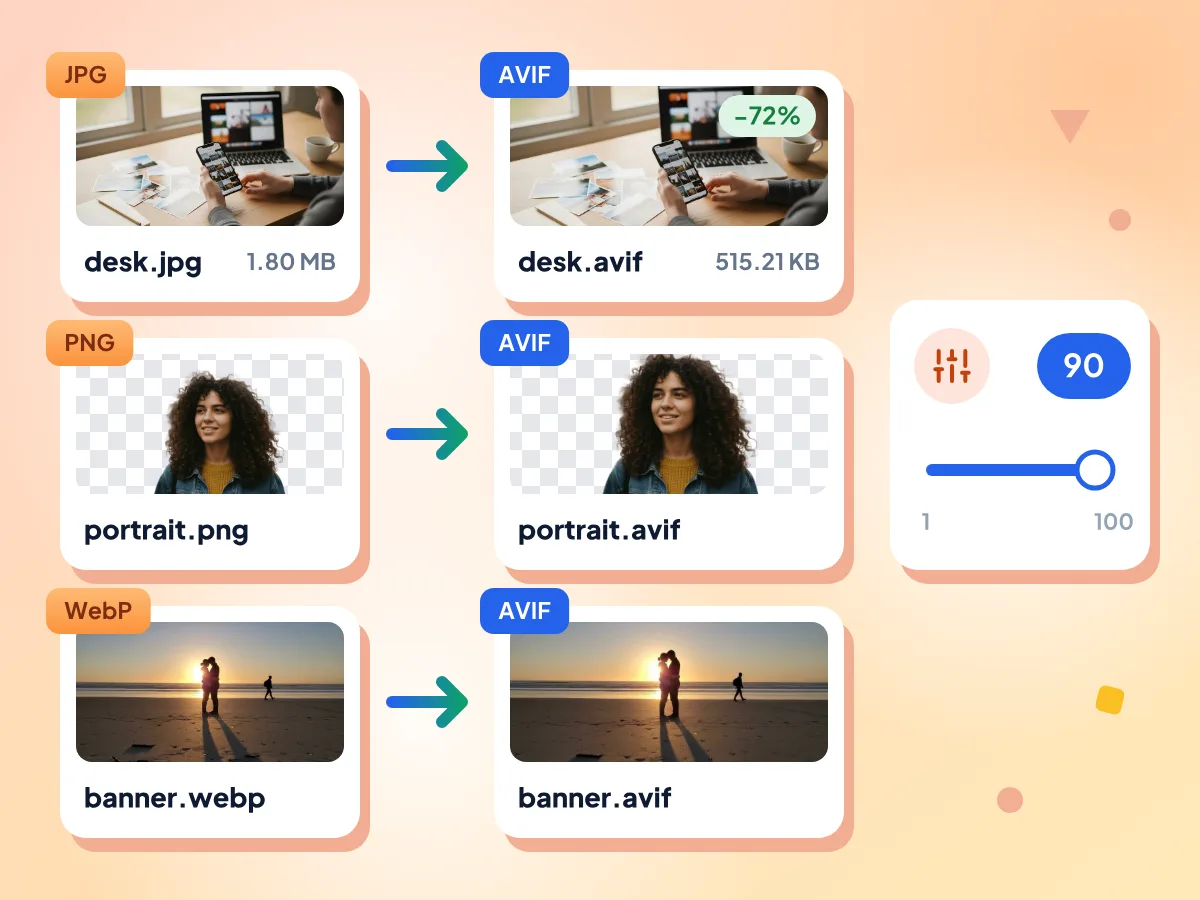
将 JPG、PNG 和 WebP 转换为 AVIF
拖入上方区域的每个文件都会自动设为 AVIF。在默认质量 90 下,我们测试的一张 1.80 MB 的 JPG 照片变成了 515 KB 的 AVIF,像素尺寸保持不变。
- 拖入的文件默认选择 AVIF
- 质量滑块范围为 1 到 100
- 透明背景保持透明
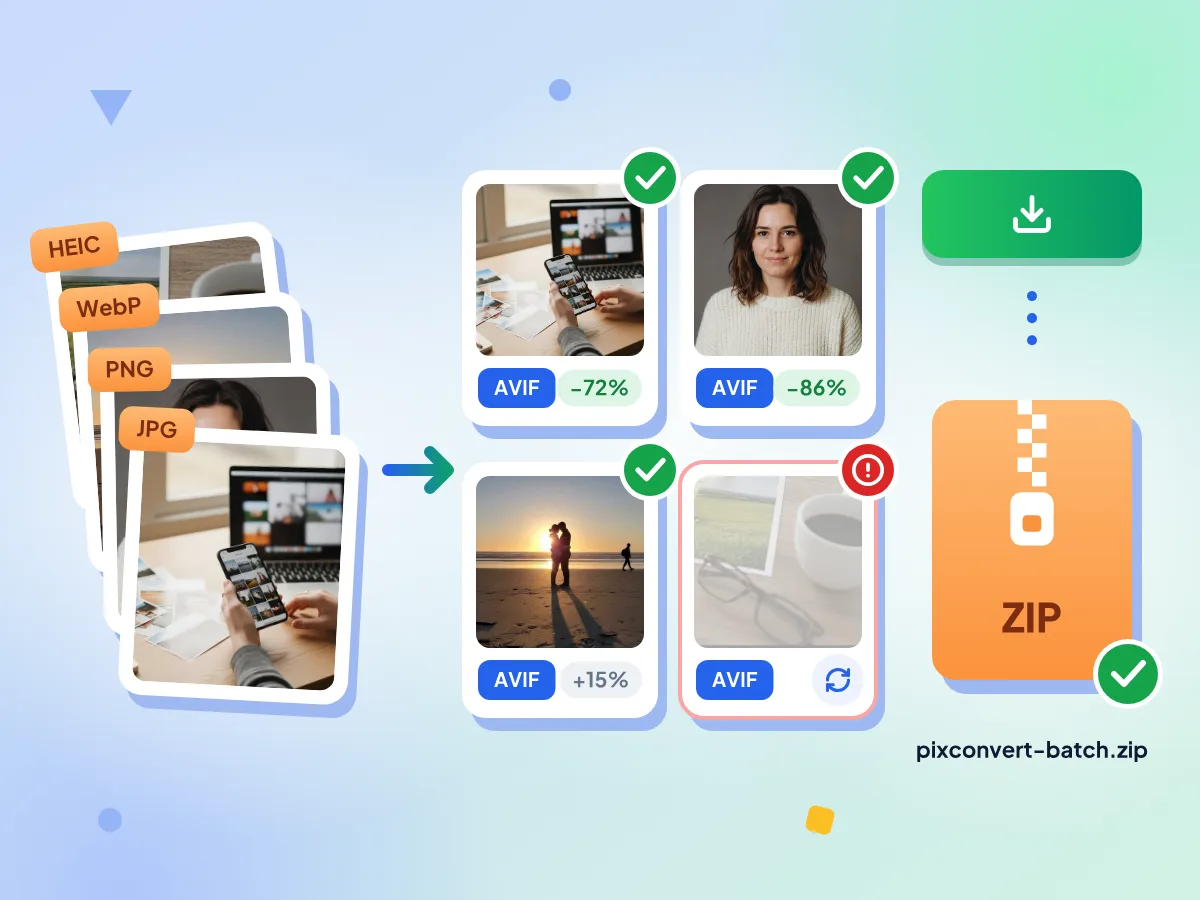
批量将图片转换为 AVIF
想添加多少张图片都可以,然后点击“全部转换”。图片会逐张编码,每个图块都会显示新的大小,点击“全部下载”即可把所有 AVIF 打包成一个 ZIP。
- 没有每日上限,也不限文件数量
- 每张图片最大 100 MB
- 可单独重试失败的文件
将 AVIF 转换为其他格式
在格式菜单中选择 JPG、PNG 或 WebP,然后点击“应用到所有文件”。JPG 会用白色填充透明区域,PNG 和 WebP 则保持透明。
默认移除 GPS 数据
“去除元数据”默认开启,因此 GPS 位置、相机信息和日期都会被移除,而颜色配置文件会保留。如需保留这些信息,可在“高级”中关闭此选项。
关于 AVIF 转换的常见问题:
关于转换为 AVIF 和从 AVIF 转换的解答。
如何把图片转换为 AVIF?
把 JPG、PNG、WebP、HEIC 或其他图片添加到顶部的区域。你拖入这里的每个文件都已自动选择 AVIF 作为输出格式,所以只需点击“全部转换”。如果想要更小或更清晰的文件,可以先调整“质量”,默认值为 90。
如何把 AVIF 文件转换为其他格式?
添加 AVIF 文件,打开“输出格式”菜单并选择所需格式,例如 PNG、WebP、TIFF 或 JPG,然后点击“应用到所有文件”和“全部转换”。如果你只需要 JPG,AVIF 转 JPG 转换器会帮你直接设置好。
AVIF 比 JPG 小多少?
这取决于图片本身和“质量”设置。在我们的测试中,一张 JPG 照片在默认质量 90 下转为 AVIF 后缩小了约 72%,在质量 50 下缩小了约 94%。编辑器会显示每个文件的大小变化,因为本来就压缩得很好的图片转换后体积反而可能变大。
可以生成无损 AVIF 吗?
暂时不行。选择 AVIF 输出时会出现“无损”开关,但在我们的测试中,它保存出的文件与质量 90 完全相同,所以这里的 AVIF 请按有损格式来看待。如需像素级一致的副本,请选择 PNG,或开启“无损”的 WebP。
AVIF 会保留透明度吗?
会。背景透明的 PNG 或 WebP 保存为 AVIF 后仍然保持透明,因为 AVIF 输出不会对图片做任何合并填充;我们用抠图 PNG 做的测试也证实了这一点。反过来,AVIF 转 JPG 会用白色或你选择的颜色填充透明区域,而 AVIF 转 PNG 则会保持透明。
可以把动画 GIF 转换为 AVIF 吗?
目前只能转为静态图片。AVIF 输出只会保留动画 GIF 或 WebP 的第一帧,该文件的图块上会显示相应提示。如需保留动画,请把输出格式保持为 GIF 或 WebP,它们会保存每一帧。
可以把 AVIF 转换成 PDF 吗?
本页面不支持。格式菜单里只有图片格式,例如 JPG、PNG、WebP、TIFF 和 GIF。你可以改用免费的图片转 PDF 工具,它支持 AVIF 文件,并会把它们放进可下载的 PDF 文档中。
为什么保存为 AVIF 比保存为 JPG 更慢?
AVIF 对图片的压缩比 JPG 强得多,这些额外的处理需要时间。在浏览器之外的测试中,一张 1600 万像素的照片大约耗时 14 秒,实际速度因你的设备而异。文件是逐个处理的,所以请保持标签页打开,直到每个图块都显示“完成”。
这个 AVIF 转换器免费且私密吗?
是的。无需注册,没有水印,也没有每日限制。转换由运行在此浏览器标签页中的 worker 完成,你的图片不会发送到我们的服务器。我们只统计基本的使用情况,例如编辑器打开了多久,绝不会记录文件名或文件内容。
AVIF 的技术规格是什么?
AV1 图像文件格式(AVIF)采用有损/无损压缩,输出画质为极佳。它支持透明度,支持动画。典型文件大小为极小。
我应该在什么时候使用 AVIF 格式?
当你面向现代浏览器,并希望在保持出色画质的同时获得尽可能小的文件体积时。 最佳使用场景包括新一代网页优化, 文件小巧的高质量摄影作品, hdr 内容分发。当你需要通用的浏览器兼容性或较快的编码速度时。
与其他格式相比,AVIF 有哪些优势?
AVIF 的主要优势:同类最佳的压缩效率. 同时支持有损和无损压缩. 支持 HDR 和广色域. 免版税的开放标准。不过也请注意:编码速度慢, 旧版浏览器支持有限。
AVIF 转换器能做什么?
让网站更快:
- 上传前先压缩首屏大图和产品照片
- 在 picture 元素中将 AVIF 作为首选格式,并以 JPG 和 WebP 作为备用
- 减小包含大量照片的页面的图片体积
适合博客和出版者:
- 以 AVIF 格式发布新闻摄影作品,减少读者的移动流量消耗
- 发布前批量压缩文章配图
- 把 AVIF 图片转回 JPG 或 PNG,用于印刷
- 转换为 AVIF 的同时,把缩略图统一调整为同一宽度
适合店铺和营销:
- 把商品目录照片转为 AVIF,让商品页面更轻量
- 让透明的商品抠图在 AVIF 格式中保持透明
- 默认移除商品照片中的 GPS 和相机数据
- 把 AVIF 转为 JPG,用于必须使用 JPG 的邮件营销