

WebM to MP3 Converter Free Online
Convert WebM to MP3 for free and save just the audio of screen recordings, calls and voice notes. Pick 32 to 320 kbps, add a batch, up to 1 GB each.
Drop your video files here
WEBM
Max file size: 1 GB · Multiple files supported
How to Convert WebM to MP3
Add your WebM recordings.
Drag them onto the box above or press Choose videos. Only .webm files are accepted here, up to 1 GB each, and a batch is fine.
Choose the bitrate.
MP3 is already the output for every file. Auto gives 256 kbps; for speech, 64 or 96 kbps makes a far smaller file. Then press Convert All.
Download the MP3 files.
Each tile has its own download button, and Download All bundles two or more into pixconvert-batch.zip. Your WebM files are left as they were.
WebM vs MP3: What Changes
Understanding the differences between WebM and MP3 helps you choose the right format for your needs.
| Specification | WebM | MP3 |
|---|---|---|
| Compression | Lossy | Lossy |
| Quality | Good to Excellent | Good |
| Transparency | No | No |
| Animation | Yes | No |
| File Size | Small to Medium | Small |
Why convert from WebM?
- Limited support on iOS and Safari
- Rarely supported by non-browser media players
- Poor support in professional editing software
Why choose MP3?
- Universal compatibility
- Small file sizes
- Good quality at reasonable bitrates
When to use WebM
When embedding video on the web and you need a royalty-free format with strong browser support.
When to use MP3
When you need universal audio compatibility and reasonable file sizes.
Free WebM to MP3 Audio Extraction
The picture is dropped and the Opus or Vorbis sound is saved again as MP3, at 256 kbps on Auto. Batch convert, no sign-up, no watermark.
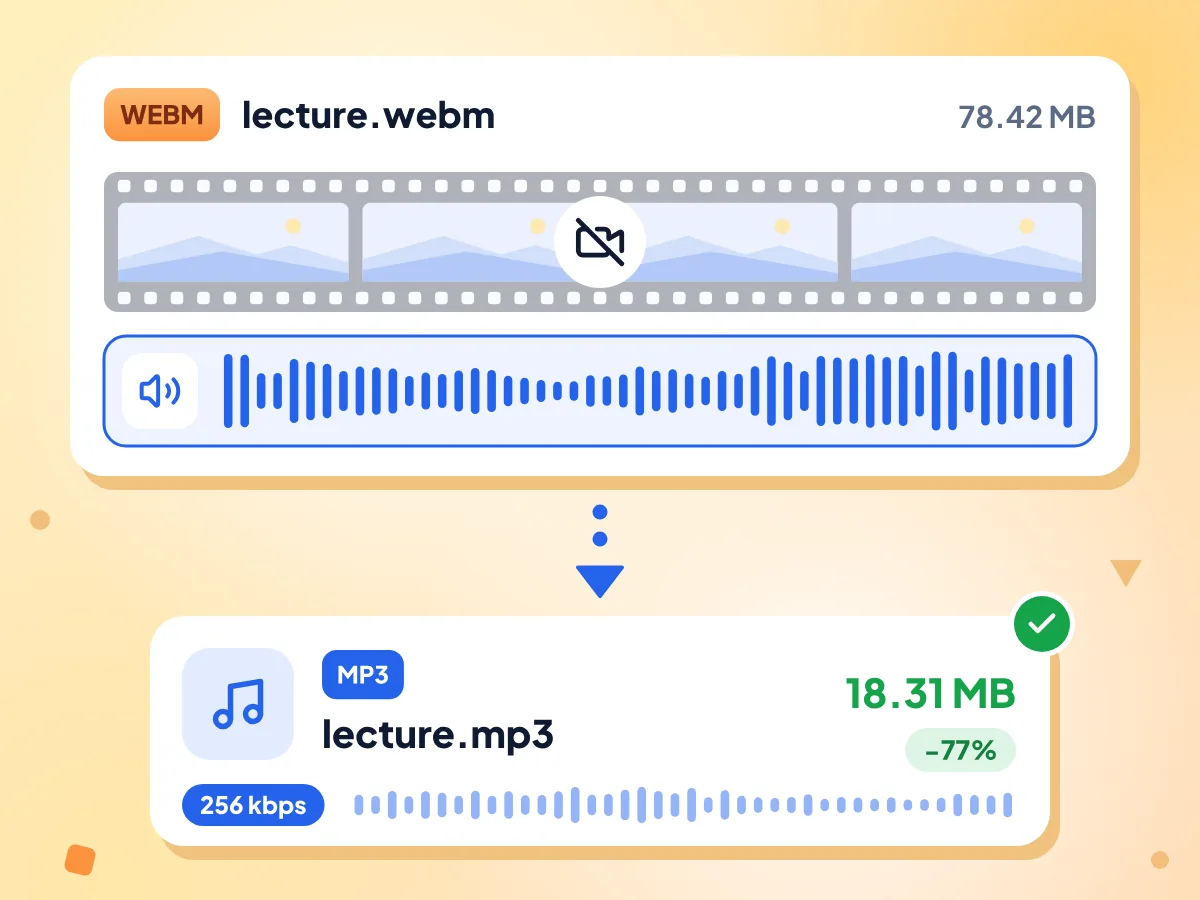
Extract MP3 Audio From WebM Files
The video track is skipped and only the sound is encoded. In a laptop test of the same engine, a 10-minute 78.42 MB recording became an 18.31 MB MP3 in about 6 seconds.
- Accepts .webm files up to 1 GB
- Reads Opus and Vorbis audio
- Sample rate and channels kept
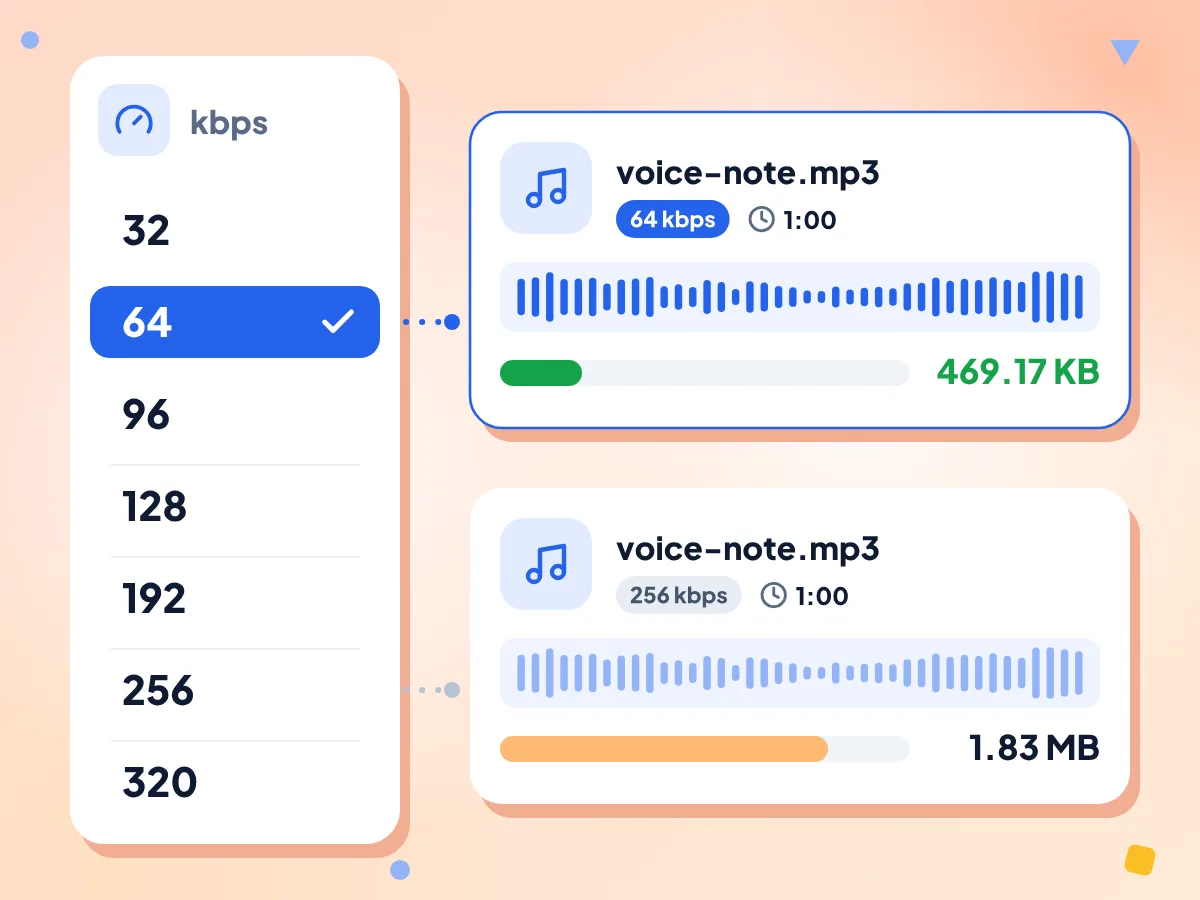
Choose Your WebM to MP3 Bitrate
Open Bitrate and pick 32, 64, 96, 128, 192, 256 or 320 kbps for every file at once. Lower rates suit talks and calls; higher ones keep more of the music.
- Seven presets from 32 to 320 kbps
- Auto saves a 256 kbps MP3
- One setting for the whole batch
Pick a Lower Bitrate for Speech
Auto saves 256 kbps, which can be bigger than the WebM: a 1-minute voice note grew from 339 KB to 1.83 MB. At 64 kbps it came out at 469 KB.
Questions About Converting WebM to MP3
Answers on bitrate, file size, recordings and errors when you turn WebM into MP3.
How do I convert WebM to MP3 for free?
Drop your .webm files on the box at the top, and MP3 is picked for each one. Press Convert All, then save the MP3s one at a time or as a single ZIP. It costs nothing and needs no account. Files added later through Add More Files usually start as MP4, so check their output.
Does converting WebM to MP3 lose quality?
A little. The Opus or Vorbis sound in the WebM is decoded and compressed again as MP3, so there is a second lossy step. At 192 kbps or more the change is usually hard to hear. A higher bitrate can't bring back detail the recording never had.
What bitrate should I pick for WebM to MP3?
For talks, meetings and voice notes, 64 or 96 kbps is usually plenty. Music sounds better at 192 kbps or more. Auto saves 256 kbps and 320 kbps is the top preset. The setting applies to every file in the batch.
Why is my MP3 bigger than the WebM?
Browser recordings often store speech as Opus at a low bitrate, while Auto writes MP3 at 256 kbps. In our test a 1-minute, 339 KB voice note grew to 1.83 MB on Auto and came out at 469 KB at 64 kbps. Pick a lower bitrate before converting.
Why does my WebM fail to convert to MP3?
Most often the WebM has no sound track, such as a screen recording made with the microphone off. There is nothing to save, and the tile shows "Conversion failed". Also check that the file ends in .webm and is under 1 GB. Damaged files fail too.
Can I convert any WebM, including VP9 and AV1 videos?
Yes, for the sound. MP3 conversion reads only the audio, so the video codec doesn't matter: VP8, VP9 and AV1 WebMs all gave MP3s in our tests. WebM audio is Opus or Vorbis, the only two kinds the format allows, and both work.
How long does it take to convert a long WebM to MP3?
Not long, because the picture is skipped. In a laptop run of the same engine, a 10-minute recording took about 6 seconds and a two-hour, 941 MB file about 90 seconds. Files near the 1 GB limit need lots of memory, so a phone may fail where a computer works.
Can I convert WebM to MP3 on Android or iPhone?
It should work in Chrome on Android or Safari on iPhone, with no app needed. Choose the .webm file from your phone, convert it, and save the MP3 from your downloads. Very long recordings use a lot of memory, so they are safer on a computer.
Will the MP3 keep the sample rate and stereo of my recording?
Yes. The sample rate is copied, so a 48 kHz recording gives a 48 kHz MP3, and a mono voice note stays mono while stereo stays stereo. There is no option to change the sample rate or mix down to mono.
Can I get WAV or the full MP4 video from my WebM instead?
Yes. Open a file's Output Format menu: the Audio tab also has WAV, AAC and OGG, and the Video tab has MP4. Skip OGG there, since a WebM sent to OGG still saves a video file. The WebM to MP4 converter starts with MP4 chosen.
Is my recording kept private?
Yes. The audio is pulled out inside this browser tab, and the recording is never sent to our servers. The page does download a 32 MB engine from the public unpkg host, plus ad and analytics scripts, and it counts visits and editor time. File names and audio are not part of that.
When You Need WebM Converted to MP3
Browser Recordings & Screencasts
- Save the narration of a screen recording as an MP3
- Turn a recorded call or webinar into audio for transcription
- Listen to a recorded lecture on your phone or in the car
For Voice Notes and Podcasts
- Convert voice notes recorded in a browser into MP3 files
- Save spoken audio at 64 or 96 kbps for small files
- Pull the audio of an interview for a podcast edit
For Many Files at Once
- Convert a batch of recordings and save every MP3 in one ZIP
- Set files you add later to MP3 before pressing Convert All
- Retry a single failed file while the rest keep going
Explore More Tools
Discover other free tools that work great alongside this one