

Free GPA Calculator
Use this free GPA calculator to work out your grade point average on a 4.0 scale. Pick a letter grade from A+ to F for each course, enter its credit hours and click Calculate GPA.
How to Calculate Your GPA
List your courses.
Click Add Course until there is one row per class. Two rows are ready to start, each set to A and 3 credits, so change or remove any you don't need.
Pick grades and credits.
Choose each letter grade from the dropdown and type the course's credit hours from your schedule or transcript. Rows with 0 or blank credits are left out.
Click Calculate GPA.
Your GPA appears to two decimals on a 4.0 scale. If you add or remove a row afterwards, click Calculate GPA again to refresh the number.
Frequently Asked Questions
Answers about the grade scale, credit hours, cumulative GPA and other grading systems.
How do you calculate your GPA?
Multiply each course's grade points by its credit hours, add those quality points, then divide by your total credits. An A in a 3-credit course (12 points) plus a B in a 4-credit course (12 points) gives 24 ÷ 7 = 3.43.
What grade point values does this calculator use?
It uses the common US 4.0 scale: A+ and A are 4.0, A- is 3.7, B+ is 3.3, B is 3.0, B- is 2.7, C+ is 2.3, C is 2.0, C- is 1.7, D+ is 1.3, D is 1.0, D- is 0.7 and F is 0.0.
What is the difference between weighted and unweighted GPA?
An unweighted GPA scores every class on the same 4.0 scale. A weighted GPA adds bonus points for honors or AP classes, often up to 5.0. This calculator gives the unweighted GPA, weighted only by credit hours, and has no honors or AP option.
How do I calculate my cumulative GPA?
Enter every course from every term in one list, each with its grade and credits, then click Calculate GPA. The tool has no box for a current GPA or past credit total, so earlier courses need rows of their own to count.
What if my school doesn't use plus or minus grades?
Pick the plain letter for each course: A, B, C, D or F. Those count as 4.0, 3.0, 2.0, 1.0 and 0.0, which matches a no-plus-minus scale. If your transcript shows a B+ that your school counts as 3.0, choose B instead.
Can I use percentages or a 10-point scale?
Not directly. The calculator only takes letter grades on a 4.0 scale. Turn each percentage or score into a letter with your school's grading policy first, since cutoffs differ: some schools start an A at 90%, others at 93%.
Does an A+ count as 4.3?
Not here. This calculator counts an A+ as 4.0, the same as an A, so the highest possible result is 4.00. Some colleges give an A+ 4.3; if yours does, your official GPA will be a little higher than this result.
Why is my GPA higher than I expected?
Check for rows you didn't fill in. Each new row starts as an A worth 3 credits, and those rows count. With a C typed in one row and a second row left as it was, you get 3.00 instead of 2.00. Remove extra rows or set their credits to 0.
Why does my GPA differ from my transcript?
Schools handle details differently. Some leave out pass/fail courses, replace a retaken grade or count an A+ as 4.3, and this tool does none of that. It also skips rows with 0 credits and rounds to two decimals, so an exact 3.475 shows as 3.47.
Can I find the grade I need for a target GPA?
Not directly, since there is no target box. Try it by hand: enter your courses, set the unknown course to a guess and click Calculate GPA. Then change that grade until the result reaches your target. Each change clears the old result first.
Are my grades saved or shared?
No. Your courses, grades and credits live only in this tab and vanish on reload, so nothing is stored or sent to us. The calculator is free with no account. Site-wide, Google Analytics counts page visits and ads load, but neither one receives your grades.
GPA Calculator With Letter Grades and Credits
Thirteen letter grades from A+ to F, credit hours down to half credits and as many courses as you need, all on a 4.0 scale.
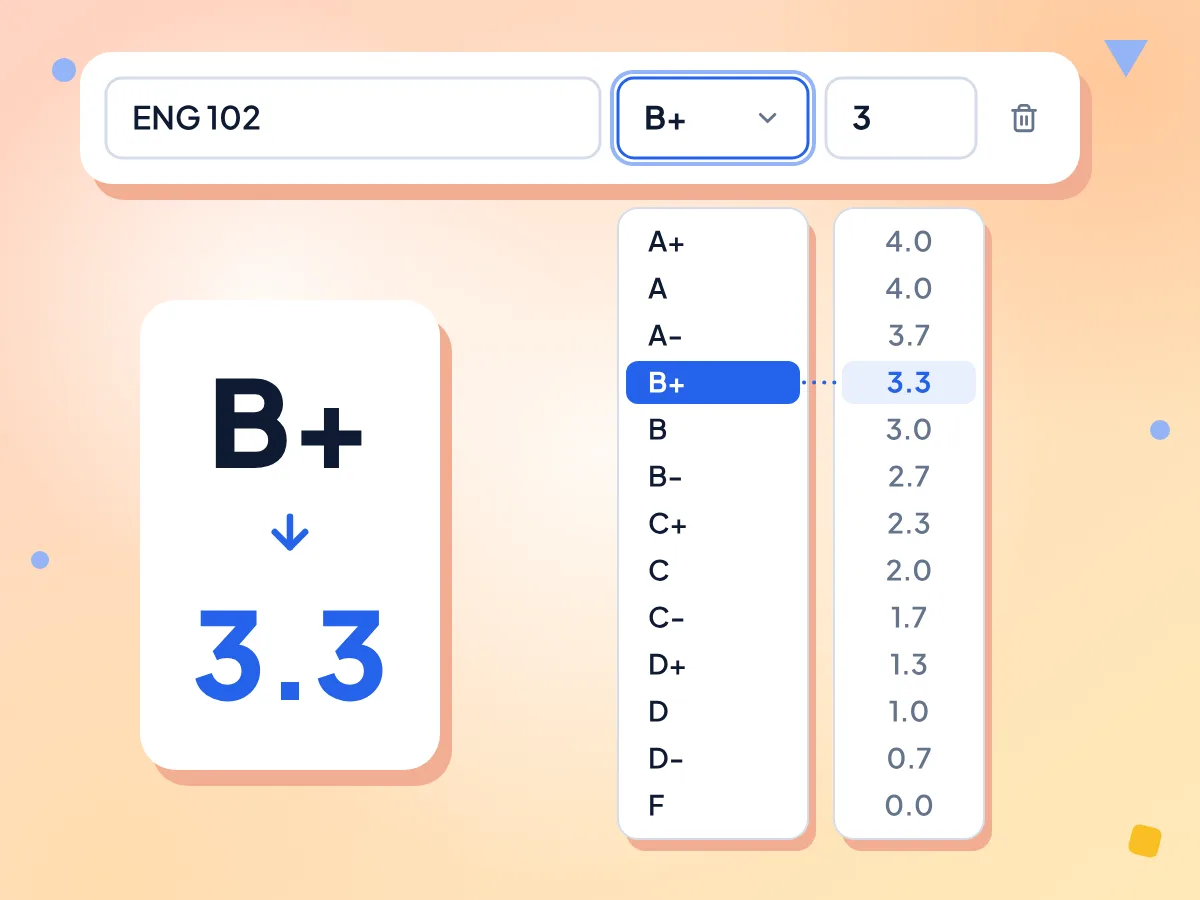
Convert Letter Grades to GPA Points
Choose a grade from A+ to F for each course. A+ and A count as 4.0, A- as 3.7 and B+ as 3.3, with each step down worth about a third of a point.
- 13 grades from A+ to F
- A+ counts as 4.0, not 4.3
- Plus and minus grades included
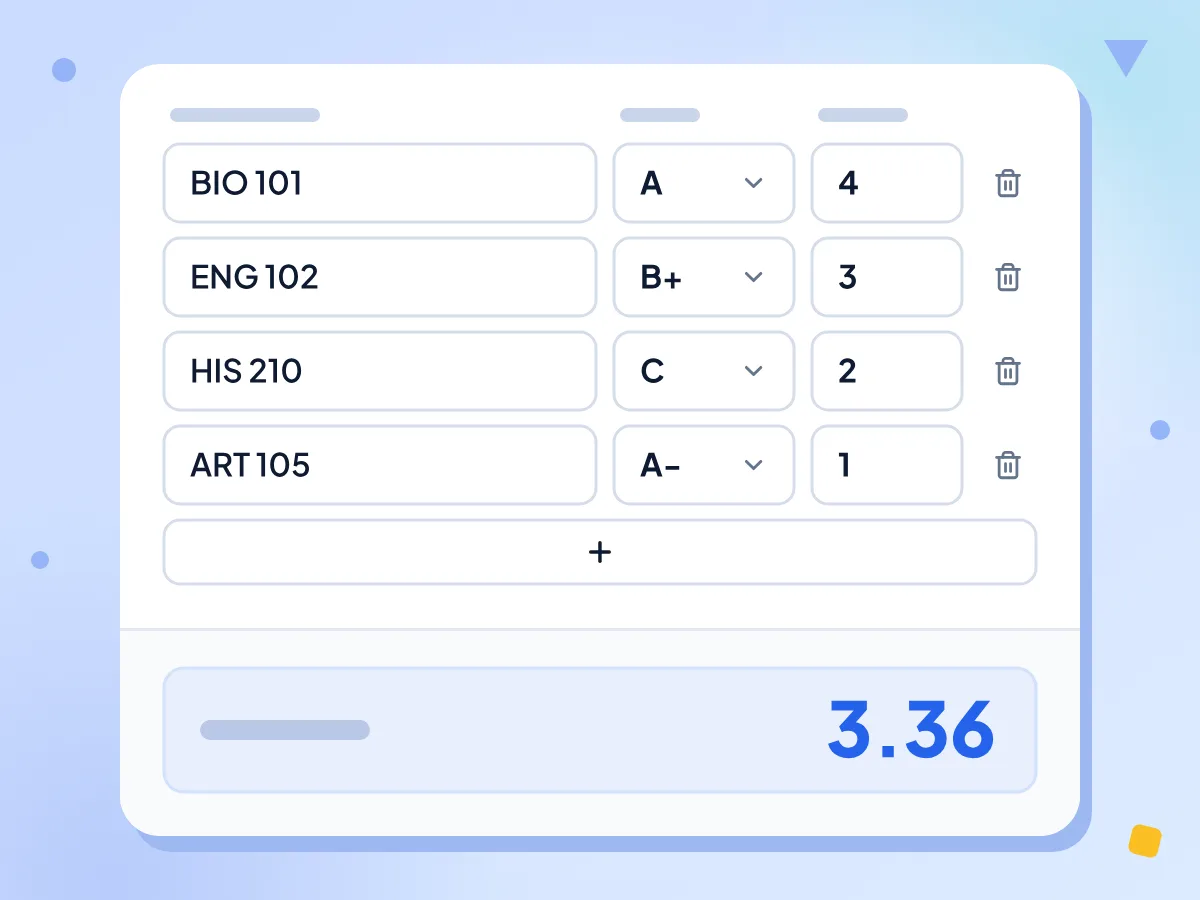
Weight Each Course by Credit Hours
Each grade's points are multiplied by the course credits, added up and divided by your total credits. So a 4-credit A lifts your GPA more than a 1-credit A does.
- Credits in half steps, like 1.5
- Rows with 0 credits are skipped
- GPA shown to two decimals
Add Any Number of Courses
Click Add Course for each class, from one semester to a full degree. The trash icon removes a row, and at least one row always stays in the list.
Optional Course Names
Type a name such as Biology 101 in any row to keep your list readable. Names are only labels, so they never change the result.
Unweighted GPA on a 4.0 Scale
Every course uses the same 4.0 scale, with no honors or AP bonus, so the result is your unweighted GPA. For a weighted high school GPA, add your school's bonus points yourself.
Free, With Nothing Saved
There is no account and no limit. Your courses and grades stay in this browser tab and aren't stored, so a reload starts you over with two default rows.
Who Uses a GPA Calculator?
College and high school students checking one term, a whole transcript or a what-if grade.
Semester GPA
Enter this term's courses with the grades you expect and their credit hours to see your semester GPA before official grades are posted.
- Preview your term GPA before grades are final
- See how a 4-credit course outweighs a 1-credit one
- Compare the result with a scholarship GPA cutoff
Cumulative GPA
List every course from every term in one go to get your cumulative GPA. There is no box for an existing GPA, so past courses need rows of their own.
- Add every term's courses to one list
- Half credits such as 0.5 or 1.5 work
- Compare your total with an honors cutoff
What-If Scenarios
Change one grade at a time to see how far it moves your GPA. Each change clears the old result, so click Calculate GPA again to compare.
- Try a B+ instead of a B in one course
- See how one F changes your average
- Test grades before you decide to drop a class
Explore More Tools
Discover other free tools that work great alongside this one
Percentage Calculator
Calculate percent of a number, what percent, or percent change
Discount Calculator
Calculate sale price and savings from a discount percentage
Tip Calculator
Calculate tip amount and split the bill between any number of people
BMI Calculator
Calculate Body Mass Index in metric or imperial units
Loan Calculator
Calculate the monthly payment, total interest and total cost of a fixed-rate loan
Currency Converter
Convert 30 currencies at daily ECB reference rates