

Compress PNG Files Free
Compress PNG files by cutting them to 256 colors or fewer while keeping transparent backgrounds and soft edges. Add one PNG or a whole batch. No sign-up, and your files never leave your device.
Drop your PNG files here
or click to browse. Up to 50 MB each, with PNG at 256 colors already set.
Compress PNG Files and Keep Transparency
A smaller color palette is what makes a PNG lighter. Choose how many colors to keep, or keep them all for a lossless file.
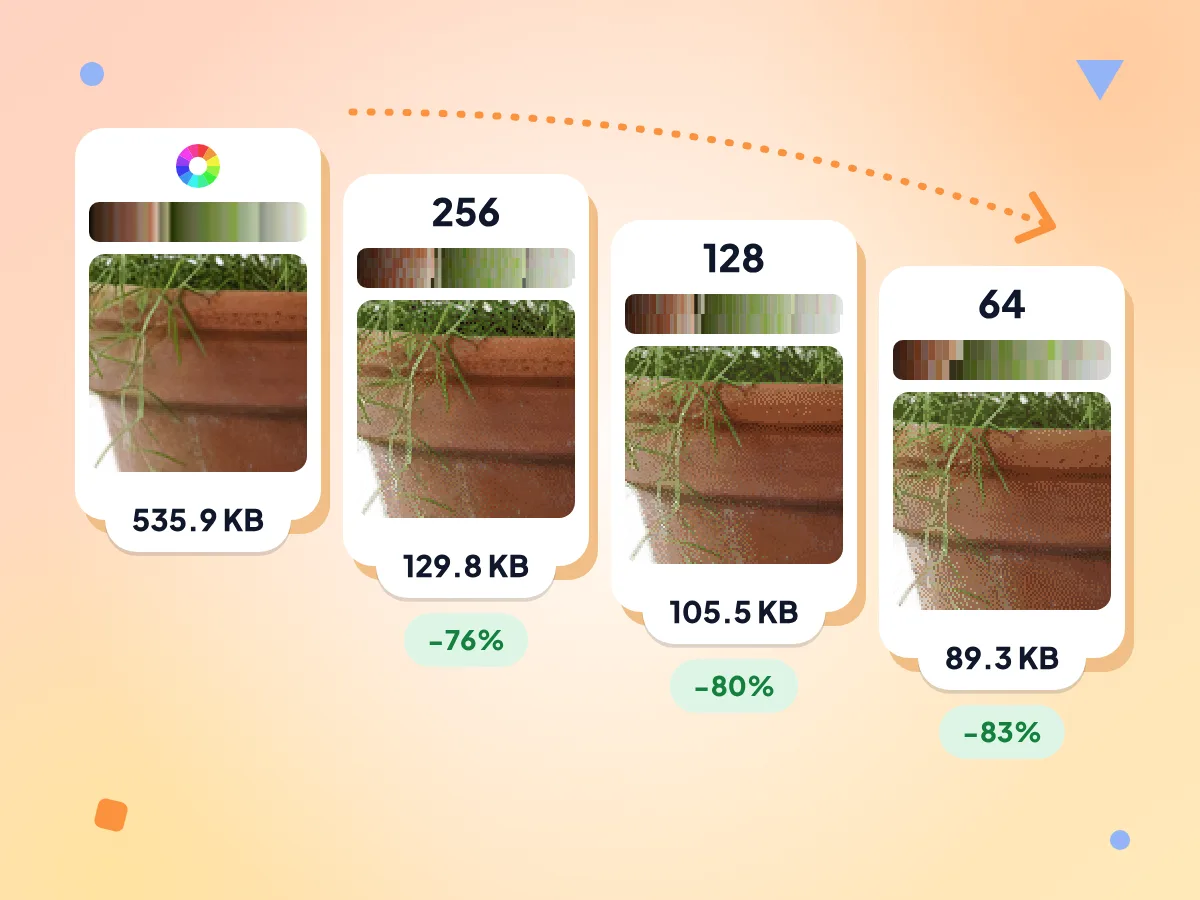
Compress PNG With Fewer Colors
Choose All, 256, 128, 64 or 32 colors. Fewer colors make a smaller PNG, and dithering blends the remaining colors so gradients don't turn into hard stripes.
- 256 colors set by default
- Test PNG: 536.1 KB to 129.8 KB
- 64 colors cut the same file 83%
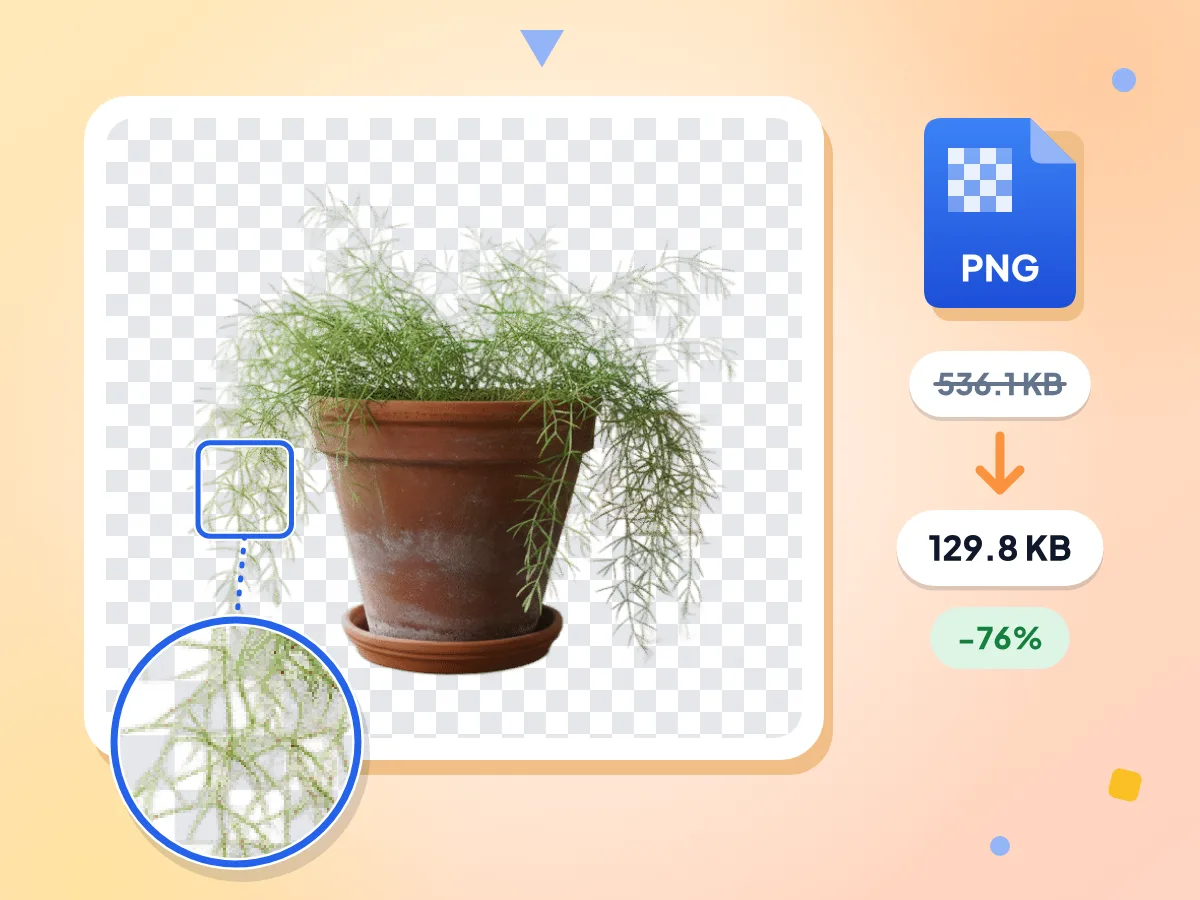
PNG Transparency Stays Clear
Transparent backgrounds and soft, semi-transparent edges survive compression. The palette PNG stores transparency for each color, so logos and cutouts sit cleanly on any background.
- Soft, semi-transparent edges kept
- Saved as an 8-bit palette PNG
- Transparent test plant: 76% smaller
Lossless When Pixels Matter
Set Colors to All and the PNG keeps every original pixel. Use it for pixel art, code screenshots or files you will edit again. Expect smaller savings this way.
Hit a KB Target
Type a limit like 200 KB, or tap 100 KB, 250 KB, 500 KB or 1 MB. The tool makes up to 8 tries, then shrinks the dimensions if needed.
Batch PNGs Into One ZIP
Drop in dozens of icons or screenshots at once. Each file shows its old size, new size and percent saved. Download them one by one or as a single ZIP.
Compare Before You Download
Drag the slider across the before and after view to check edges, text and gradients. If you spot banding, step up to more colors and run it again.
How to Compress a PNG
Add your PNG files.
Drop one image or a batch onto the upload area. The editor opens with PNG output and 256 colors already selected.
Pick your colors.
Keep 256 for most images, try 64 or 32 for flat logos, or choose All for a lossless file. Add a KB target if a form has a limit.
Check and download.
Compare each result with the slider and see how many KB you saved. Save files one at a time or grab them all in one ZIP.
When a Smaller PNG Helps
PNG is the format for sharp edges and transparency, which is also why the files get heavy.
Website Graphics and Icons
Logos, icons and UI graphics rarely need millions of colors, so a 256-color palette usually makes them smaller. Lighter files help your pages load faster.
- Logos with transparent backgrounds for headers and footers
- Icon sets and buttons for apps and websites
- Product cutouts for online store listings
Screenshots and Docs
Screenshots saved as PNG can run to several megabytes. Cutting them to a smaller palette keeps text sharp while making them easier to share and embed.
- Tutorial and help center screenshots with readable text
- Bug reports and support tickets with attachment limits
- Slides, wikis and docs that load slowly
Upload Forms and Size Limits
Some forms ask for a PNG under a set size, such as a signature or profile image. Set the target in KB and keep the PNG format.
- Scanned signatures that have to stay under 100 KB
- Profile pictures and avatars for sites with upload caps
- Stickers and emotes with transparent backgrounds for chat apps
PNG Compression Questions
Colors, transparency, target sizes and when another format makes more sense.
How do I reduce PNG file size?
Lower the number of colors. Add your PNG, keep the preset of 256 colors and press Compress Image. The picture is rebuilt from a palette of up to 256 colors and saved as an 8-bit PNG, which is usually much smaller than a full-color one.
Can I compress a PNG without losing quality?
Yes. Set Colors to All and the PNG stays lossless, so every pixel matches the original. The savings are small that way. At 256 colors most graphics look the same to the eye, and the file shrinks much more.
What do the 256, 128, 64 and 32 color options mean?
They set the most colors the compressed PNG can use. The tool builds a palette that fits your image and blends it with dithering. Fewer colors make a smaller file, but smooth gradients may show banding at 64 or 32.
Does PNG compression keep soft, semi-transparent edges?
Yes. The palette PNG stores a transparency level for each color, so shadows, glows and smoothed edges stay partly see-through. That matters for logos and cutouts placed on colored backgrounds, where a hard edge would look jagged.
Why are PNG files so large?
PNG saves every pixel exactly, with up to millions of colors and a transparency channel. That suits sharp graphics but makes photos heavy. Cutting the palette to 256 colors or fewer removes much of that weight while keeping edges crisp.
Which images shrink the most as PNG?
Big PNGs with many colors shrink the most, like photos, cutouts and full-page screenshots. In our tests, a plant cutout dropped 76% at 256 colors and a 3.76 MB screenshot dropped 51%. Small, already optimized graphics may barely change, so check the percent saved.
Should I convert my PNG to JPEG or WebP instead?
For photos, often yes. Pick WebP to keep transparency at a smaller size, or JPEG for the widest support. JPEG has no transparency, so clear areas are filled with a background color, white by default. Keep PNG for logos, icons and text.
How do I compress a PNG to 100 KB?
Tap the 100 KB button or type 100 in the target size box, then compress. The tool makes up to 8 tries to fit the limit, then scales the image down if it has to. If it still can't fit, it shows the smallest size reached.
Will compressing change my PNG's width and height?
No, not by default. Resize starts at None, so the dimensions stay the same. Choose Max edge to cap the longest side, 1920 px unless you change it, or Percent to scale down. A KB target that colors alone can't meet also shrinks the image.
Is a 256-color PNG still a normal PNG?
Yes. It is a standard 8-bit indexed PNG that browsers, design apps and image viewers open like any other. Only the way the colors are stored changes. You can open it, edit it and save it again as usual.
Why does my PNG look grainy or banded after compressing?
The image needs more colors than you allowed. Grain comes from dithering, which mixes palette colors to fake smooth shades, and banding shows when a gradient runs short of colors. Switch to 256 colors, or All for a lossless file, and compress again.
Is it safe to compress PNG files here, and is there a limit?
Yes. Your PNGs are compressed on your own device and never sent anywhere. There is no sign-up, no watermark and no daily cap. Each file can be up to 50 MB, and you can add as many as your device's memory can handle.
Explore More Tools
Discover other free tools that work great alongside this one
JPEG Compressor
Shrink JPG photos with a quality slider or KB target
GIF Compressor
Make animated GIFs smaller and keep every frame
WebP Compressor
Shrink WebP images, animated ones stay animated
Image Compressor
Reduce file size without losing quality
Image Resizer
Resize images to exact dimensions
Image Converter
Convert between 30+ image formats