

Free Online Business Card Generator
Design elegant 3.5x2 inch business cards in your browser. Choose layout presets, add your contact info, and export print-ready vector PDFs.
Create Professional Business Cards
Type your details, pick a template and brand color, and download your card as a PDF.
- 3 professional templates
- 85.6 × 53.98 mm card size
- Custom brand colors
- PDF download, no watermark
No sign-up required. Your data never leaves your browser.
Who Uses Business Card Generators?
For anyone who needs a simple card with their name and contact details, without paying a designer or learning design software.
Freelancers & Consultants
Put your name, job title and contact details on a clean card to hand out at meetings. Take the PDF to a print shop or send it by email.
- Your job title shown in your brand color
- Website and email lines on the same card
- A small PDF to take to a print shop that accepts no-bleed files
Small Business Owners
Give your team matching cards. Keep the same template and brand color, change the name and title for each person, and download one PDF per employee.
- Company initial on the Modern color stripe
- The same hex color on every card
- One file per person, named after them
Professionals & Executives
Make a plain, readable card before a conference, interview or trade show. Minimal keeps the card mostly white with a thin color bar, which suits formal settings.
- Minimal layout with a thin color bar
- Phone, email, website and address on one card
- No account to create before a deadline
What You Get With This Free Business Card Maker
Three templates, ten preset brand colors plus a color picker, and seven fields. Download one card as a vector PDF with no watermark.
Choose a Business Card Template
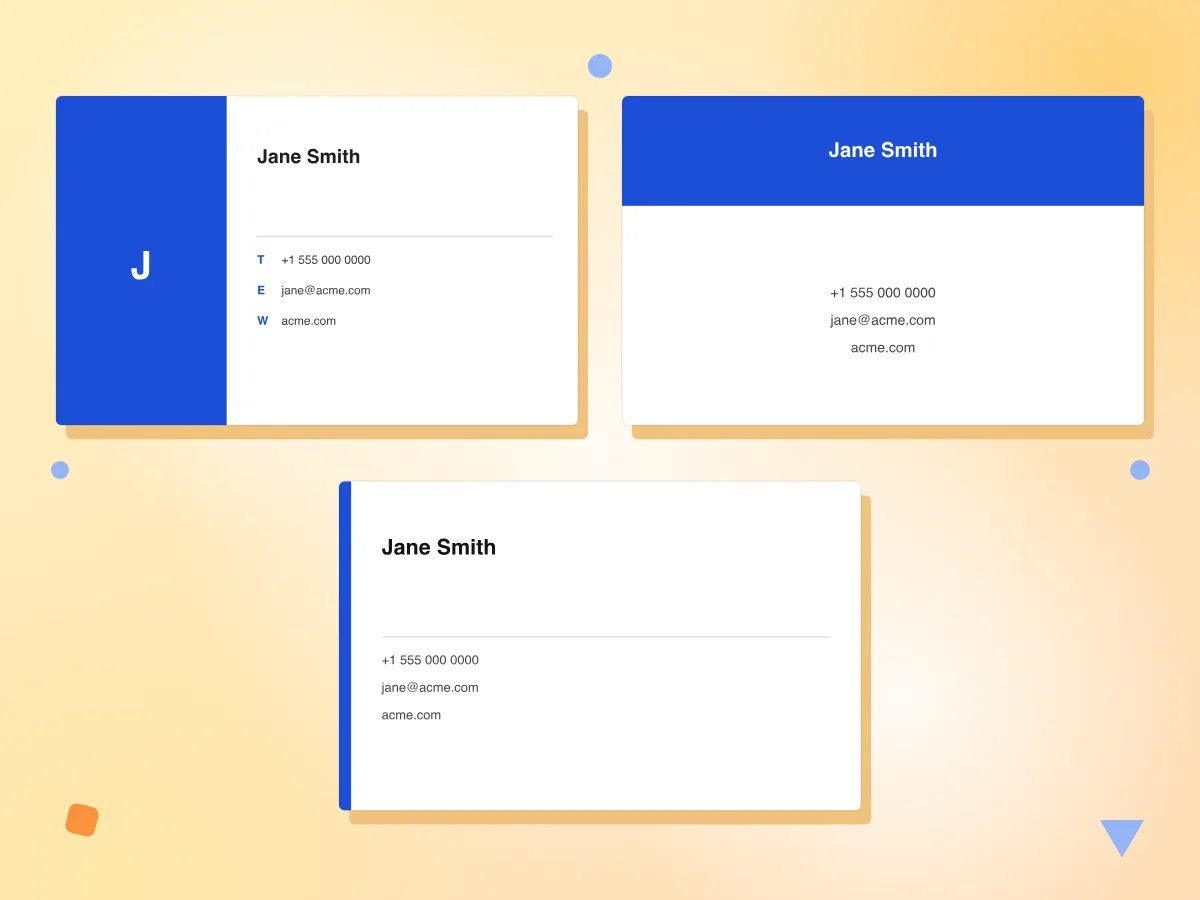
Switch between Modern, Classic and Minimal at the top of the form. Modern adds a color stripe with your initial, Classic a color header band, and Minimal a thin bar on the left.
- Modern, Classic and Minimal layouts
- Preview redraws as you type
- Empty contact lines are left out
Download Your Business Card as a PDF
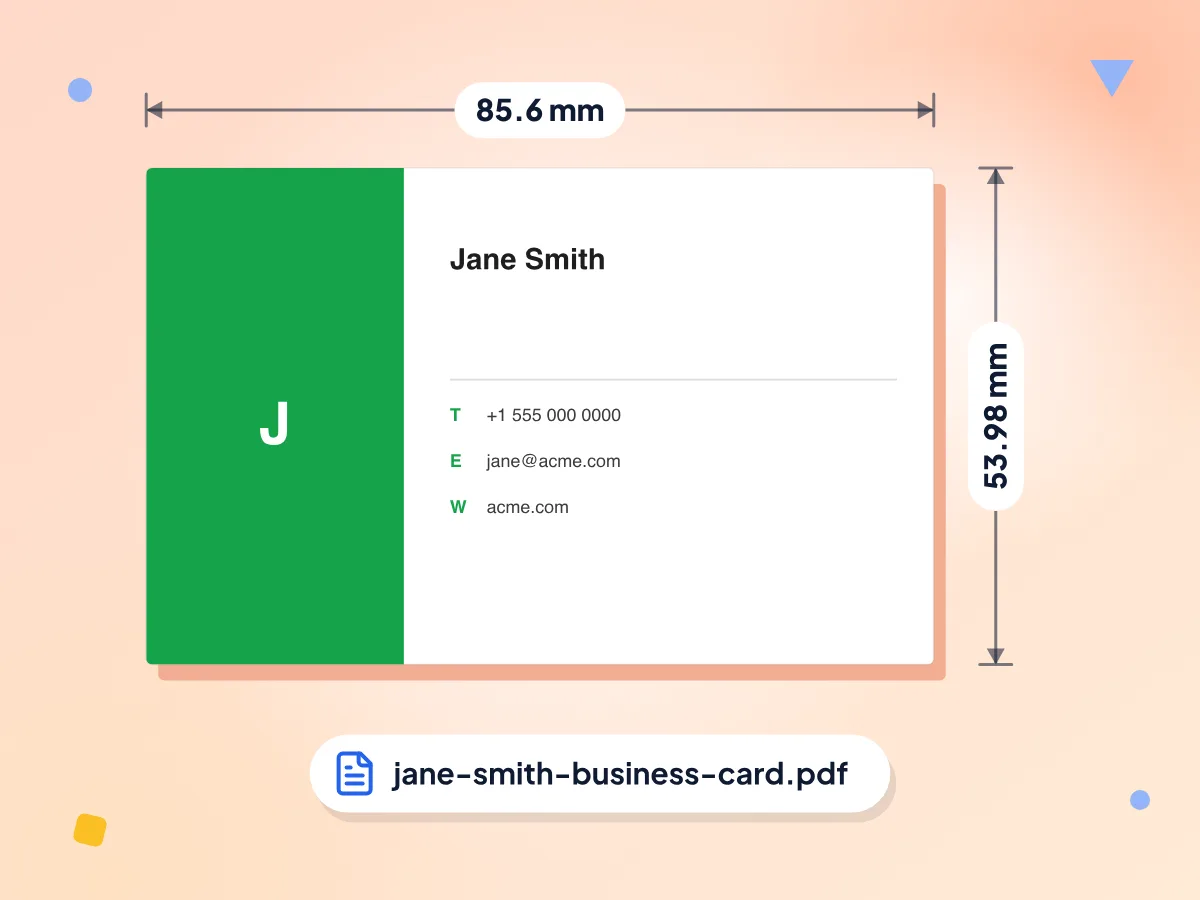
Click Download PDF to save one card front at 85.6 × 53.98 mm, the credit card size. Text and shapes are vector, so they stay sharp when you zoom in or print.
- One card per page, 85.6 × 53.98 mm
- Sharp vector text in Helvetica
- Named after you, like jane-smith-business-card.pdf
Free, No Sign-Up, No Watermark
Design and download cards without an account, a trial or a daily cap. Your PDF carries only the name and contact details you type, with no PixConvert branding on the card.
Match Your Brand Color
Each shade fills the stripe, band or bar and colors one text line: the job title on Modern and Minimal, the company on Classic. Text on the color stays white, so pick a darker shade.
Seven Fields for Your Details
Add your name, job title, company, email, phone, website and address. Lines don't wrap, so a long name or address can run past the edge of the card.
Stays on Your Device
The card is built in your browser and saved straight to your device, so your details are never sent to us. Nothing is stored, so download before you close the page.
How to Create a Business Card in 3 Steps
Enter your details.
Click Design Business Card, then type your name, job title, company and the contact lines you want on the card. Empty fields are left off.
Pick a style and color.
Choose Modern, Classic or Minimal, then tap one of 10 preset colors or open the color picker. The preview updates as you type.
Download the PDF.
Check the preview, then click Download PDF. You get one card at 85.6 × 53.98 mm, named after you, to print or send to a print shop.
Frequently Asked Questions
Answers about card size, printing, templates and the PDF you download.
How can I make my own business card for free?
Open the editor, type your name, job title and contact details, then pick Modern, Classic or Minimal and a brand color. Click Download PDF to save the card. There is no account, trial or watermark, and you can make as many cards as you need.
What size is the business card?
The PDF is 85.6 × 53.98 mm, the same size as a credit card. That is close to the common European size of 85 × 55 mm. US cards are usually 3.5 × 2 inches (88.9 × 50.8 mm), so a US printer may crop the file slightly or add a thin margin.
What file format should I use to print business cards?
PDF is the usual choice, and that is what you get. Text and shapes are vector, so they print sharp at any resolution. The file has no bleed or crop marks and uses RGB color, so check whether your print shop needs bleed or CMYK before you order.
Can I print business cards at home?
Yes. Open the PDF, print at actual size (100%) on card stock and trim along the card edge. Each file holds one card, not a sheet of ten, so print it as many times as you need. Minimal is mostly white, so a small trimming slip shows less, except along its color bar.
Can I add a logo or QR code to my business card?
No. There is no image upload and no QR code field. The Modern template puts the first letter of your company in large type on the color stripe, which works as a simple monogram. For a QR code, make one with our free QR code generator and add it in a design app.
Can I change the font or text color?
No. The PDF uses Helvetica for all text, and the text on the color stripe or header band is always white. You choose only the brand color, so pick a darker shade such as navy or deep green to keep that white text easy to read.
Is there a free business card maker without a watermark?
Yes, this one. The PDF carries only the details you type and the shapes of your template, with no PixConvert logo or watermark. You also don't need to sign up or log in, and there is no daily limit on how many cards you make.
Why does my text run off the edge of the card?
Each line prints at a fixed size and doesn't wrap or shrink. On Modern, a name of about 30 letters fills the width and contact lines fit about 45 characters. Shorten long lines, for example by dropping https:// from your website, or switch to Minimal, which has more room.
Why do some letters look wrong in my business card PDF?
The PDF uses Helvetica, which covers English and Western European letters such as é and ü. Polish letters like Ł, Cyrillic and Chinese text come out garbled in the PDF, even though the preview shows them correctly. Type those names in Latin letters to avoid this.
Can I make a double-sided business card?
No. The PDF has one page with the front of the card only. If your print shop offers double-sided cards, you can leave the back blank or ask them for a plain color back. A back-side design is not part of this tool.
Can I make a digital business card?
Partly. The PDF is only a few kilobytes, so you can email it or send it in a chat app as a digital card. It is not a vCard, so phones won't add your details to contacts with one tap, and there is no link or QR code to share.
Does the business card generator save my details?
No. Your details stay in the open page and are never sent to us, because the PDF is built in your browser. Reloading or closing the tab clears the form, so download first. The page loads Google Analytics for visit counts; the card tool sends it nothing you type.
Explore More Tools
Discover other free tools that work great alongside this one
Resume Builder
Build a PDF resume from your experience and skills
Invoice Generator
Make free PDF invoices with tax and discounts
Certificate Generator
Design and download professional certificates as PDF
Signature Maker
Draw your signature and save it as PNG or SVG
QR Code Generator
Make and download free QR codes in your colors
Image to PDF
Convert JPG, PNG, WebP images to a PDF document